

Loans · Where each payment actually goes
Amortization Schedule Calculator
Short answer
A $300,000 loan at 7.18% for 30 years has a $2,032.30 payment and $431,629.62 of interest, paid off in December 2056 if the first payment is January 2027. An extra $250 a month saves $140,899.67 and 101 months. Principal does not beat interest until payment 245. This amortization calculator is for anyone who wants the split before they send an extra check. The caveat: the first 244 payments are mostly interest, and the rate is an example, not an offer. At the November 19, 2026 average of 7.28%, the same loan costs $2,052.64 a month.
Last reviewed: November 20, 2026. Rates from the Freddie Mac PMMS of November 19, 2026. Illustration, not a forecast.
Amortization calculator
It answers how much of each check is rent to the lender, and how much actually shrinks what you owe. Someone with one fixed-rate loan, not a pile of cards, is who this is for. The caveat: extras shorten the loan, they do not lower the required payment, and the rate is an example. Educational only. Not financial advice.
Worked example: $300,000 at 7.18% for 30 years
Open the amortization calculator on $300,000, 7.18%, 30 years, first payment January 2027, and no extras. The payment is $2,032.30. You make 360 payments. Interest is $431,629.62. Total paid is $731,629.62. The last payment lands in December 2056.
Payment 1 is almost all interest: $1,795.00 interest, $237.30 principal, balance $299,762.70. A year later the balance is $297,056.74. Five years out it is $282,931.29. Ten years out it is $258,516.80. Year 1 interest is $21,444.39 and year 1 principal is $2,943.26. The 15-year preset, $250,000 at 6.57%, has a $2,187.40 payment and $143,732.06 of interest. The auto preset, $35,000 at 6.9% for 5 years, has a $691.39 payment and $6,483.51 of interest. The rental chip uses $225,000 at 8.18% for 30 years, an example investor rate one point over the same PMMS week.
Today's rates on a $300,000 loan
Mortgage rates jumped this week. Freddie Mac's 30-year average hit 7.28% on November 19, 2026, up from 7.11% a week earlier and 6.26% a year ago. Here's what that does to the same $300,000 loan, before taxes and insurance.
| Rate (Freddie Mac PMMS) | Term | Monthly payment | Total interest |
|---|---|---|---|
| 6.26% (Nov 20, 2025, a year ago) | 30 years | $1,849.10 | $365,677 |
| 7.11% (Nov 12, 2026) | 30 years | $2,018.12 | $426,523 |
| 7.18% (Nov 5, 2026, the calculator default) | 30 years | $2,032.30 | $431,630 |
| 7.28% (Nov 19, 2026) | 30 years | $2,052.64 | $438,949 |
| 6.66% 15-year (Nov 19, 2026) | 15 years | $2,639.78 | $175,161 |
One year of rate drift added about $204 a month and $73,000 of lifetime interest. The 15-year costs $587 more a month than the 30-year at 7.28%, yet it saves about $264,000 of interest. Type any of these rates into the calculator to see the schedule. Investors usually pay more than these averages; the DSCR loan calculator covers rental loans. Source: Freddie Mac PMMS.
How amortization works
The amortization calculator is just a queue. The lender takes interest first, on whatever you still owe, then whatever is left of the payment reduces the balance. Next month the interest is a little smaller, so principal is a little larger. The payment stays put. That is the whole trick, and it is why the amortization calculator can print every month without calling a bank.
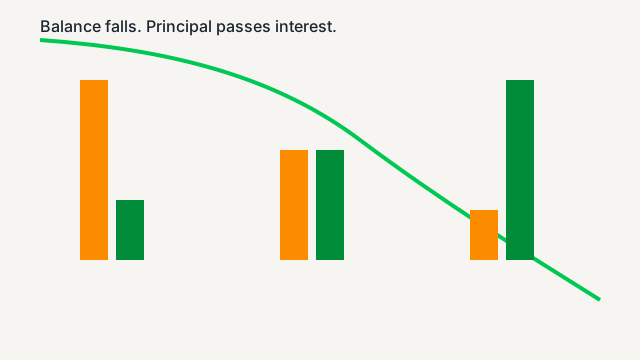
On the default loan, principal stays smaller than interest until payment 245. Those first 244 payments are mostly rent to the lender. After the crossover, each payment finally bites the balance harder than it feeds interest. If the rate is 0, there is no interest and the payment is the loan divided by the number of months. If you pay the loan off early, the last payment is whatever balance and interest remain, not a full $2,032.30.
Extra payments: monthly, yearly, one-time, or biweekly
The comparison table on this amortization calculator runs the same loan five ways: no extra, your monthly extra, your yearly extra, your one-time extra, the biweekly add-on, and all of them together. With the boxes at zero, those rows match. Put $250 in the monthly box and the monthly row goes to 259 months and $290,729.95 of interest.
Yearly extras on the amortization calculator follow the calendar. Pick December and a January start, and the extra hits payment 12, 24, 36, and so on. $3,000 each December finishes in 263 months, interest $295,789.56, a save of $135,840.06 and 97 months. A one-time $10,000 at payment 12 finishes in 325 months, interest $369,801.75, a save of $61,827.87 and 35 months. Biweekly, as this page defines it, finishes in 284 months (23 years 8 months), interest $323,346.47, a save of $108,283.14 and 76 months.
Tell the servicer the extra is principal. If they hold it as a future payment, you did not shorten the loan and you did not save the interest. Ask about a prepayment penalty before you send a large lump. The heatmap shows months saved by a monthly extra at 5%, 6%, 7.18%, 8%, and 9%. A higher rate makes the same extra dollar more valuable, because you are avoiding a more expensive balance.
Using it for rentals, cars, and personal loans
The amortization calculator does not care what the loan bought. A rental note, a car, and a personal loan all use the same split if the rate is fixed and the payment is level. The rental chip is $225,000 at 8.18% for 30 years, one point over the example 7.18% home rate. Run the rent and the payment together in the SFR rental calculator before you decide the payment is "fine."
A car loan is usually short, which is why the auto chip is 5 years. You will not see a payment-245 crossover on a 60-month note. Personal loans and credit cards that do not have a fixed payment do not belong in this schedule. For several balances at once, the debt snowball calculator orders them. This page is one loan, one rate, one payment.
Should you pay extra or invest?
Extra principal earns a sure rate: the loan rate, after any tax deduction you actually use. Investing might earn more, and it might not, and the money is not there if you spend it. On a 7.18% loan the hurdle is high. On a 3% loan it is a different conversation. This amortization calculator shows the interest you avoid. Run the amortization calculator again if the rate on the note is not 7.18%. It does not forecast a brokerage account.
If you are choosing 15 years versus 30 years rather than a single extra payment, use the 15 vs 30 year mortgage calculator. It keeps the two loans side by side, including what happens if you invest the payment gap. Neither page is a recommendation. Returns are not guaranteed.
How to use this amortization calculator
- Enter the loan amount, the rate, the term, and the month the first payment lands.
- Leave every extra box at zero if you want the plain schedule. The payment is the standard amortization payment.
- Add a monthly extra, a yearly extra, a one-time amount, or the biweekly toggle. The on-top boxes stack, and they do nothing while they sit at zero.
- Switch the schedule between monthly rows and yearly totals. Yearly totals add up the months. They do not sneak in a second formula.
- Copy the link, download the CSV, or print the table. The link leaves out extra, yearly, once, oncem, and biweek while they are still at their defaults.
What the numbers mean
- Payment
- The contractual monthly payment. Extra principal does not change it. The last payment gets smaller when the leftover balance is smaller.
- Interest
- The opening balance times the rate divided by 12, added up for every month on this schedule.
- Principal
- The rest of the payment, plus any extra, which reduces the balance. It never tries to pay more than the balance.
- Payoff date
- The calendar month of the last payment. The first payment month and year set that calendar.
- Months saved
- The plain schedule length minus this schedule. Zero extras means zero months saved.
Frequently asked questions
What is an amortization schedule?
An amortization calculator builds a schedule that splits every payment into interest and principal. On a $300,000 loan at 7.18% for 30 years, payment 1 is $1,795.00 of interest and $237.30 of principal, and the balance falls to $299,762.70. The contractual payment is $2,032.30. The schedule runs 360 months and charges $431,629.62 of interest. That first split is why the balance barely moves.
How much interest will I pay on a 30-year mortgage?
This amortization calculator puts the default 30-year loan at $431,629.62 of interest, so you pay $731,629.62 in all. Year 1 alone is $21,444.39 of interest and only $2,943.26 of principal. After 12 payments the balance is $297,056.74. After 5 years it is $282,931.29. After 10 years it is $258,516.80. The rate is an example, the Freddie Mac PMMS 30-year for the week of Nov 5, 2026, not an offer. At the Nov 19, 2026 average of 7.28%, the payment is $2,052.64 and lifetime interest is $438,949.26.
How much do extra payments save?
On this amortization calculator, an extra $250 a month cuts the same loan to 259 months and $290,729.95 of interest. That saves $140,899.67 and 101 months (8 years 5 months). An extra $3,000 each December takes 263 months and saves $135,840.06 and 97 months. Ask the lender to apply the extra to principal. A prepayment penalty can erase the win, so read the note before the check goes out.
Is biweekly better than monthly?
Biweekly on this amortization calculator means one extra payment a year, modeled as the regular payment divided by 12 and added every month. That is 284 months and $323,346.47 of interest, which saves $108,283.14 and 76 months versus the plain schedule. A lender biweekly program often charges a fee for the same math. Sending the extra yourself does the job without the fee. It is not 26 separate drafts unless the servicer is set up that way.
Why is most of my payment interest at the start?
Interest is the balance times the monthly rate, and the balance is largest on day one. The amortization calculator shows principal beating interest for the first time at payment 245. The first 244 payments are mostly interest. That is why the early years feel slow, and why an extra dollar in year 1 saves more than the same dollar in year 25. The crossover date on a January 2027 start is the month of payment 245.
Does a one-time extra payment lower my monthly payment?
Not on a fixed-rate loan. The amortization calculator keeps the payment at $2,032.30 and shortens the term instead. A $10,000 extra at payment 12 finishes in 325 months and cuts interest to $369,801.75, a save of $61,827.87 and 35 months. Recasting, which some servicers offer for a fee, is the version that lowers the payment. This page does not recast. It pays the loan off sooner.
Do the extra boxes stack?
Yes. Extra every month and extra monthly on top are added together. The yearly pair and the one-time pair work the same way. Leave the on-top boxes at zero and the schedule matches the boxes above them. A one-time amount on top is skipped when its payment number is 0. Biweekly is one extra payment a year, and the link omits biweek when that toggle is off.
Educational only. Not financial advice. Example rates, not offers. A lender schedule may differ by a few cents because of rounding and the day the payment posts.